Introduction
Most outreach tools look impressive on landing pages. Dashboards are polished, feature lists are long, and promises are ambitious. The real test, however, begins only after a campaign goes live. How predictable is the workflow? How easy is it to adjust messaging mid-campaign? How much cognitive effort is required to keep things running smoothly?
This deep dive examines Alsona not from a marketing lens, but from an operational one. The goal is to understand how Alsona behaves in real usage—how campaigns are structured, how workflows unfold over time, and where the tool quietly excels or intentionally restrains itself.
Rather than repeating surface-level feature lists, this article focuses on:
- Campaign architecture
- Workflow logic
- Safety controls
- Inbox handling
- Day-to-day usability
If the introductory article explained what Alsona is, this one explains how it works when you rely on it consistently.
Campaign Architecture: How Alsona Thinks About Outreach
At the heart of Alsona is a linear, step-based campaign model. This is a deliberate design choice.
Where some platforms offer deeply branched logic trees with dozens of conditional paths, Alsona opts for readable sequences that progress in a clearly defined order. Each campaign is composed of actions and delays, executed one step at a time.
A typical campaign structure looks like this:
- Initial LinkedIn action (profile visit or connection request)
- Delay (configurable)
- Follow-up action (message or email)
- Conditional check (response or no response)
- Next action or exit
This architecture has two immediate advantages:
- Campaigns are easy to audit visually
- Unexpected behavior is rare
For users who prefer predictability over sophistication, this design reduces operational risk.
LinkedIn Workflow in Detail
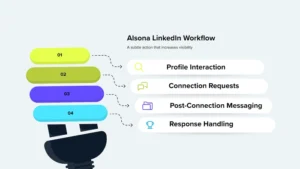
Step 1: Profile Interaction
Many Alsona campaigns begin with a profile visit, a subtle action that increases visibility without initiating a conversation. This is especially useful in outreach strategies where soft awareness is preferred before direct engagement.
The platform allows users to:
- Queue profile visits in bulk
- Control daily limits
- Space visits naturally across time
This step is optional but often used by recruiters and consultants to warm up prospects.
Step 2: Connection Requests
Connection requests are central to LinkedIn outreach, and Alsona treats them with restraint.
Key characteristics:
- Daily connection limits are enforced
- Delays between requests are configurable
- Messages can be attached or omitted
Users are encouraged to keep connection messages short and contextual. Alsona does not push AI-generated messaging aggressively; instead, it assumes the user has a defined outreach narrative.
Step 3: Post-Connection Messaging
Once a connection is accepted, follow-up messaging can be triggered automatically.
Alsona supports:
- First follow-up messages
- Delayed nudges if no response occurs
- Exit logic if a reply is received
Importantly, messages are not stacked or fired in rapid succession. Each step respects the pacing defined at the campaign level, helping conversations unfold naturally.
Step 4: Response Handling
When a prospect replies:
- The campaign for that contact typically pauses
- The conversation moves to the unified inbox
- Manual engagement takes over
This handoff between automation and human response is one of Alsona’s strengths. It prevents over-automation once genuine interest is detected.
Email Workflow Integration
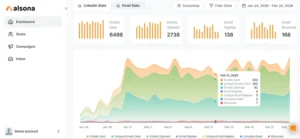
Alsona’s email functionality is designed to extend, not replace, LinkedIn outreach.
Email steps are commonly used in two scenarios:
- As a fallback when LinkedIn engagement stalls
- As a formal follow-up after initial LinkedIn interaction
How Email Fits into Campaigns
Email steps can be inserted:
- After a LinkedIn message receives no response
- As a parallel follow-up channel
- As a closing nudge in longer sequences
Emails are sent according to the same delay and pacing rules as LinkedIn actions, ensuring consistency across channels.
Campaign Controls and Safety Mechanisms
Daily Limits
Alsona enforces daily action limits at the platform level. These limits apply to:
- Profile visits
- Connection requests
- Messages
- Emails
While users can adjust limits, the interface subtly encourages conservative values. This reduces the temptation to scale too aggressively.
Delays and Timing
Delays are configurable at both:
- Step level
- Campaign level
This allows users to create realistic spacing between actions. For example:
- A two-day wait after a connection request
- A three-day pause before a follow-up message
This timing flexibility helps outreach feel intentional rather than automated.
Cloud Execution and Stability
Because Alsona operates in the cloud:
- Campaigns continue even if the user logs out
- Execution is consistent across time zones
- There is no dependency on browser uptime
This is particularly valuable for users running campaigns across multiple regions.
Inbox and Conversation Management
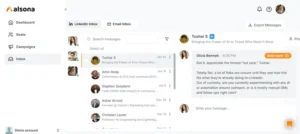
Unified Inbox Design
Alsona’s inbox consolidates:
- LinkedIn replies
- Email replies
Each conversation is displayed with:
- Contact details
- Message history
- Campaign context
This contextual view helps users respond appropriately without reopening campaign configurations.
Manual Intervention Philosophy
Once a reply is received, Alsona largely steps back. The assumption is that human conversation should take priority.
This design prevents:
- Automated follow-ups from interrupting real dialogue
- Misaligned messaging during active conversations
For many users, this boundary between automation and human engagement is critical.
Workflow Examples in Real Use
Example 1: Founder-Led Sales Workflow
A founder runs a campaign targeting a specific job role:
- Day 1: Profile visit
- Day 3: Connection request
- Day 6: Introductory message
- Day 10: Email follow-up
Replies are handled manually, with automation pausing automatically. The founder reviews inbox messages once per day, responding selectively.
Example 2: Recruiter Sourcing Workflow
A recruiter targets passive candidates:
- Connection request without message
- Follow-up message after acceptance
- Email nudge if no LinkedIn response
This workflow maintains professionalism while reducing repetitive tasks.
Example 3: Small Agency Outreach Workflow
An agency uses Alsona internally:
- Separate campaigns for different services
- Conservative daily limits
- Messaging refined monthly
Campaigns are monitored weekly, not constantly, freeing time for client delivery.
Usability and Learning Curve
Alsona’s learning curve is intentionally shallow.
New users typically:
- Understand campaign logic quickly
- Make fewer configuration mistakes
- Spend less time debugging workflows
The interface avoids exposing unnecessary complexity, which is particularly helpful for non-technical users.
SEO & Content Considerations for Outreach
From a messaging perspective, Alsona works best when users invest time in
- Well-written connection messages
- Clear value propositions
- Specific targeting
Automation amplifies clarity; it does not create it. Alsona’s structure reinforces this principle by limiting over-automation.
Limitations in Advanced Workflow Scenarios
While Alsona’s workflows are reliable, they are not designed for:
- Highly branched decision trees
- Complex scoring logic
- Deep CRM-triggered automation
Users requiring those capabilities may find Alsona intentionally restrained.
Final Assessment: How Alsona Performs in Daily Use
Alsona performs best when treated as a discipline-enforcing system rather than a growth accelerator.
Its workflows are
- Predictable
- Stable
- Easy to reason about
For professionals who value control, clarity, and consistency, these qualities often matter more than advanced automation tricks.
Closing Thoughts
A deep dive into Alsona reveals a platform that values good habits. It does not reward recklessness or scale for scale’s sake. Instead, it encourages users to:
- Define thoughtful sequences
- Respect timing
- Step in personally when conversations matter
In an ecosystem crowded with automation tools, Alsona’s restraint is not a limitation; it is a design choice.
Disclaimer: This review reflects extensive team usage experience and publicly available information. Pricing and features are subject to change. Always verify current details on the official website and ensure your usage complies with LinkedIn’s Terms of Service and your organization’s policies.