Most AI tools look impressive in a product demo. The real question is how they hold up when you are two hours before a campaign launch with six ad sets to populate and no designer available. This deep dive examines AdCreative.ai through that operational lens.
Can the generation quality be trusted? Are the scores meaningful? How much manual work is still required after generation? This deep dive examines AdCreative.ai through that operational lens — looking at how each major feature performs in practice, where the platform genuinely saves time, and where it still requires human judgment to produce results worth publishing.
Setting Up a Brand: The Foundation of Everything
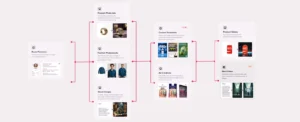
The quality of what AdCreative.ai generates is directly connected to the quality of what you put into your brand setup. This is the first and most important step, and it is worth spending time on rather than rushing through.
Brand setup involves uploading your logo (in high resolution), specifying primary and secondary brand colors, writing a brief brand description, and optionally connecting your ad accounts. The platform uses this information to calibrate all creative generation to your brand identity.
💡 One important detail: you can connect your Facebook Ads, Google Ads, and other ad platform accounts to your brand. When you do this, AdCreative.ai analyzes your historical performance data to tailor its recommendations to your actual audience and past results. The more historical data your connected account contains, the more relevant the scoring becomes for your specific brand rather than general benchmarks.
The Creative Generation Flow in Practice
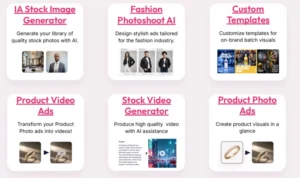
Once a brand is set up, generating creatives follows a consistent workflow:
- Select your campaign goal (awareness, conversion, retargeting, and so on)
- Input your product or service details, or scan your website URL to extract them automatically
- Choose your ad sizes and formats; you can select multiple simultaneously
- Generate variants: the platform produces multiple creative options immediately
- Review the creative scoring for each variant
- Download the variants you want to use, spending download credits only at this stage
❌ Traditional ProductionDesigner briefing, iterations, and resizing = hours to days per campaign
✔ With AdCreative.aiMultiple ad variants across multiple sizes generated in seconds
The speed of generation is genuinely fast. For a team producing regular creative output, this time-saving is the most immediately quantifiable value the platform delivers.
Creative Scoring in Real Use
The Creative Scoring AI analyzes each generated ad against over 140 data points before you spend any credits. In practice, the scores are displayed as a percentage or rating alongside each generated creative, and the system also provides component-level feedback, flagging weak CTAs, poor contrast ratios, or suboptimal product placement.
How Scoring Accuracy Works
Scoring AI
The scoring is most reliable when your ad account has meaningful historical data connected. For brands with limited campaign history, the scores are based on general performance benchmarks from AdCreative.ai‘s training data rather than your specific audience patterns. The system becomes more precise over time as it learns from your actual campaign outcomes.
One practical note: treat scores as a prioritization guide rather than an absolute guarantee of performance. They help you decide which variants to test first — but they do not eliminate the need for actual campaign testing.
Product Photoshoot AI: Practical Results
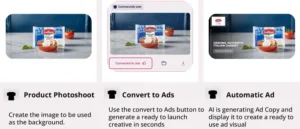
The Product Photoshoot AI takes standard product photos and generates professional-grade lifestyle and background variants. This is genuinely useful for e-commerce businesses that cannot afford frequent photography sessions for every product SKU.
The quality is consistently strong for simple, well-photographed source images. Product edges are cleanly separated, backgrounds are realistic, and the output is typically publication-ready for social ads. The technology handles apparel and accessories particularly well.
Where Quality Holds — and Where It Drops
E-Commerce
✔ Works Well
- Simple, well-photographed source images with clean edges
- Apparel and accessories in particular
- Products with solid or minimal backgrounds in the original shot
❌ Where It Falls Short
- Heavily textured products or complex shapes with intricate details
- Source images with poor original lighting
- Products where the AI struggles with edge detection
💡 The AI can only work with what is in the original image — the quality of your input photography still matters.
Video Ad Generation: What Each Format Delivers

AdCreative.ai generates several distinct video ad formats, each suited to different campaign objectives and content strategies:
| Format | How It Works | Best For |
|---|---|---|
| Text-to-Video | Generates video ads from text descriptions and brand assets | Simple product showcases and awareness campaigns |
| Image-to-Video | Transforms static product images into short video clips with motion | Social ads where movement increases engagement |
| UGC-Style Videos | Uses AI avatars to create creator-style content with multiple avatar styles | Brands wanting creator-produced look without the cost |
| Fashion Clips | Specialised format showing apparel and accessories in motion | Fashion and lifestyle brands |
⚠ The UGC video format is the most notable and the most uneven in quality. When it works well — with a clean product image, an appropriate avatar, and a clear brief — the output looks convincingly creator-produced. Plan for a review step and likely some iteration before using UGC video output in live campaigns.
Competitor Insights AI: How to Use It Effectively
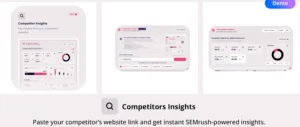
The Competitor Insights feature is accessed by entering a competitor’s website URL. The platform then shows you their estimated traffic, audience demographics, top traffic channels, and best-performing ad creatives across platforms.
The creative intelligence component — seeing which ad formats and visual styles your competitors are running and which appear to be performing well — is the most directly actionable part. This kind of competitive intelligence previously required manual monitoring or expensive third-party tools.
How to Apply Competitor Intelligence
Intelligence
Use it as an input to your creative brief rather than a template to copy. Understanding that your competitor’s best-performing ads feature user testimonials, short-form video, or a specific color palette gives you directional intelligence.
The actual execution still needs to be your own — both for brand differentiation and for the platform’s creative scoring to reflect your specific audience.
Ad Text Generation in Practice
The text generator produces headlines, descriptions, and calls to action based on your product information and selected tone. It works across several copywriting frameworks: benefit-led, urgency-based, social proof-oriented, and others.
The output quality is solid for standard e-commerce and direct-response formats. For brands with a distinctive voice or nuanced positioning, the generated copy often needs editing to feel authentically on-brand.
💡 Treat generated copy as a strong first draft rather than finished copy — it saves time relative to writing from scratch but still benefits from a human pass.
A Realistic Daily Workflow for a Performance Marketer
To make this concrete, here is how a performance marketer managing paid social campaigns might use AdCreative.ai in a typical week:
A Week in Practice
Workflow
Monday AM
New campaign brief arrives. Use Competitor Insights to research what’s working in the category. Scan brand website to auto-populate creative brief.
Monday PM
Generate 30+ creative variants across required ad sizes. Review scoring. Download the top 8 for initial testing.
Tuesday
Set up an A/B test in the ad platform using the downloaded creatives. Launch campaign.
Thursday
Initial performance data available. Identify the two top performers. Return to AdCreative.ai to generate more variants in the same visual style.
Friday
Connect updated ad account data. Review refreshed creative recommendations for the next week’s campaigns.
🕐 What this compresses: the creative production cycle that previously required designer briefing, iteration, and production time now fits into a few hours. The marketer’s time shifts from waiting for production to strategic evaluation.
Where Manual Work Is Still Required
Being honest about where human judgment remains necessary:
- Brand voice in copy: Generated text needs editing for tonal accuracy in many brand contexts
- Complex product messaging: Technical or nuanced product positioning is not reliably captured by template-based generation
- Creative direction: The platform generates variants; it does not set the strategic direction for your campaign
- Quality review: Output should always be reviewed before publishing; not all generated creatives reach publication quality
- Performance interpretation: The scoring AI guides prioritisation but does not replace campaign management judgment
Honest Limitations in Daily Use
- The 10-credit Starter plan limit is quickly reached for any serious campaign volume
- Post-generation editing capability inside the platform is limited; major revisions typically require exporting and editing in external tools
- Credits do not roll over — unused credits in a given month are lost
- Video generation quality requires iteration and manual review before publishing
- For teams with strong existing design processes, the creative output style may feel generic without significant customization
Final Assessment
In daily use, AdCreative.ai earns its place for teams that need to produce ad creative at volume and speed. The Creative Scoring AI is its most genuinely differentiated capability — making data-informed creative decisions before campaign launch is a meaningful operational advantage.
The limitations are real but manageable. For performance marketers and e-commerce teams, the platform delivers consistent time savings that justify the investment at the Professional plan level and above.
📋 Key Takeaways from Real Use
- Brand setup quality determines output quality — take time on it, especially connecting ad accounts with historical data.
- Creative scoring is a prioritisation tool, not a guarantee — it tells you what to test first, not what will definitely win.
- Product Photoshoot AI delivers strong results for clean, well-photographed source images; complex products need better source material.
- UGC video is the most powerful and most uneven format — always review before publishing.
- Competitor Insights is best used as a directional brief input, not a copy template.
- Generated copy works as a strong first draft — budget time for a human editing pass for on-brand voice.
- The platform compresses creative production cycles from days to hours for performance marketing teams.
See How AdCreative.ai Performs for Your Campaigns
Start your 7-day free trial with 10 download credits. No design team required — just your brand assets and a product to sell.